
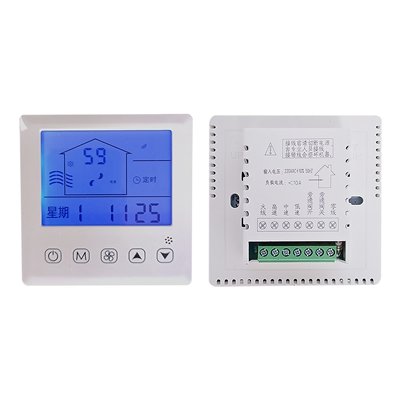
8836XF Fresh Air System Controller
Key Specifications
· Fresh air system controller with ventilation and air quality functions
· High/Medium/Low fan speed · Bypass valve switch
· Filter replacement reminder · Timing switch (on/off)
· Temperature and humidity detection function
· CO₂-based automatic fan speed control (with optional CO₂ module)
· 86×86×38mm · 136g
Why Choose 8836XF
· Three Fan Speeds – High/Medium/Low speed control for flexible ventilation demand
· Bypass Valve Control – Built-in bypass valve switch for energy recovery or pressure relief
· Filter Reminder – Alerts when filter needs replacement, ensuring healthy air quality
· Timer Scheduling – Programmable on/off timing for automatic operation
· Temp & Humidity Detection – Monitors room temperature and humidity in real time
· CO₂ Auto Fan Control – Optional CO₂ module enables automatic fan speed adjustment based on real‑time CO₂ levels, improving energy efficiency and indoor air quality
· Compact Size – 86×86×38mm fits standard wall boxes
· Lightweight – Only 136g for easy installation
Operation Functions
1. Manual Mode Operation Logic
The unit operates at the fan speed set by the user in Manual mode.
2. Timer Mode Operation Logic
In Timer mode, the fan runs automatically according to the user-configured ON and OFF times.
3. Auto Mode Operation Logic
In Auto mode, the fan speed adjusts automatically based on the indoor CO₂ level:
Low speed when CO₂ < 450 ppm
Medium speed when CO₂ is between 451 ppm and 1000 ppm
High speed when CO₂ > 1001 ppm
(Note: This function is only available on units equipped with the optional CO₂ module.)
4. Fan Speed Setting
When powered on, press the Fan Speed key to cycle through Stop, Low, Medium, and High speeds.
(Note: Fan speed can only be adjusted in Manual mode; switching is disabled in Timer mode.)
5. Bypass Damper ON/OFF
Press and hold the Fan Speed key for 5 seconds while powered on to enable or disable the bypass damper.
6. Check Filter Runtime
Press and hold the Up key for 5 seconds while powered on to view the filter’s total operating hours.
7. Clear Filter Runtime
Press and hold the Down key for 5 seconds while powered on to reset the filter’s operating hour counter.
8. Time & Timer Setting
When powered on, press and hold the Mode key for 5 seconds to enter the time adjustment menu. Press the Mode key again to cycle through adjustable items in sequence: Weekday, Hour, Minute, Timer ON Time, Timer OFF Time, and scheduled fan speed.
9. RS485 Communication Address Setting
When powered on, press and hold the Mode and Fan Speed keys together for 5 seconds to enter the hexadecimal RS485 address configuration interface. Adjust the value using the Up/Down keys, switch digit positions with the Mode key, and press the Power key to save and exit.
(Note: This function is only available on units equipped with the optional RS485 module.)
10. Restore Factory Settings
When powered on, press and hold the Power and Up keys together for 5 seconds. The full screen will blink to confirm factory settings have been restored.
11. Sensor Fault Alarm
Temperature sensor failure triggers an error code E alarm.
Humidity sensor failure triggers an error code H alarm.
12. Filter Alarm
The filter icon flashes when runtime reaches 1000 hours, while the fan continues normal operation.
The filter icon stays lit when runtime reaches 3000 hours, prompting filter cleaning or replacement.