
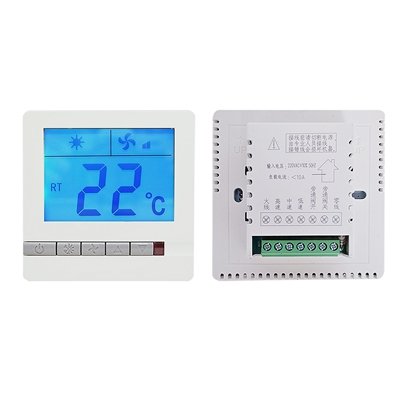
8905XF fresh air controller with Modbus RS485
Key Specifications
· Fresh air system controller (ventilation)
· Display temperature when switch off
· Linkage function available
· IR remote control (optional)
· 86×86×38mm · 170g
The 8905XF is a fresh air controller designed for ventilation systems. It supports multiple fan speeds, timing operation, and filter runtime monitoring. Optional IR remote and linkage function add convenience, while the RS485 Modbus interface enables integration with building automation systems.
This controller supports Modbus RTU communication. For official protocol details, visit the Modbus Organization website.
Why Choose 8905XF Fresh Air Controller with Modbus RS485
· Temperature Display When Off – Shows room temperature even when the controller is turned off, for easy monitoring
· Linkage Function – Optional device-to-device automation (e.g., with AC or fresh air damper)
· IR Remote Ready – Optional infrared remote control for convenient operation
· Compact Size – 86×86×38mm fits standard wall boxes
· Lightweight – 170g for easy installation
8905XF fresh air controller with Modbus RS485-Operation Functions
1. Multi-speed Manual Operation Mode
– Stop speed, Low speed, Medium speed, High speed adjustable under manual mode.
– Manual mode runs at fixed fan speed set by user.
2.Timing Operation Mode
– Automatically run according to pre-set start/stop time and designated fan speed.
– Fan speed cannot be modified when timing function is activated.
3. Bypass Damper Control Function
– Short press fan speed key to open or close bypass air valve under power-on state.
4. Filter Runtime Reminder & Reset Function
– Short press fan key for 3s: view cumulative filter working hours.
– Long press fan key for 8s: clear recorded filter runtime data.
– Filter alarm reminder: blink icon at 1000H, steady-on icon at 3000H service alert.
5. Clock & Weekly Timer Setting
– Long press clock button to enter time setup.
– Adjustable options: Week, Hour, Minute, Timed ON/OFF time & corresponding running fan speed.
6. Button Lock & Parameter Functions
– 485 Communication Address Setup: Long press Mode+Speed key 5s to set Modbus address (for RS485 model only).
– Factory Reset: Long press Power+Up key 5s to restore factory default parameters.
7. Fault Alert & Advanced Custom Parameters
– Sensor Failure Alarm: Display error E1 when temperature sensor malfunctions.
– Advanced configurable items: Temperature calibration, fan speed definition, backlight setting, power-off memory options etc.