
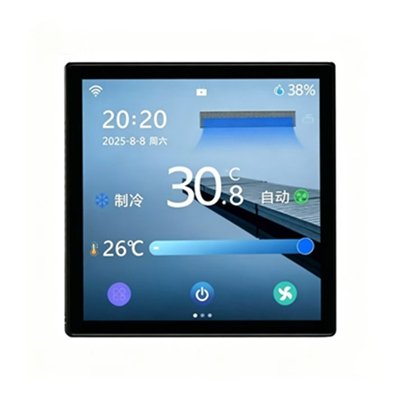
T605 4-inch touchscreen Modbus Thermostat
Key Specifications
· Modbus communication · 4 inch touchscreen
· 2-pipe / 4-pipe · AC/DC compatible
· FCU + fresh air + floor heating
· Cooling / Heating / Floor cooling / Floor heating / Fresh air
· 86×86×40mm
Why choose T605
· The T605 is a 4-inch touchscreen Modbus thermostat that Control your entire HVAC system — fan coil, fresh air, and floor heating — all from one 4-inch touchscreen. Modbus integration ready.
· Touch-Smart Control – Modern, user-friendly interface.
· Standard 86-Type Size – Easy replacement and installation.
4-inch Touchscreen Modbus Thermostat Operation Functions
1. Clock Adjustment
– Enter: While on, press and hold the Fan Speed button for 5 seconds.
– Adjust: Blue text indicates the active setting. Press Fan Speed to cycle through minutes, hours, and day-of-week. Use Up/Down buttons to change values.
– Save & Exit: Press the Power button.
2. Timer Function
-Enter: While on, press and hold the Mode button for 5 seconds.
Adjust: Blue text indicates the active setting. Press Fan Speed to cycle through timer minutes, hours, and status. Press Mode to switch between timer-on and timer-off settings. Use Up/Down buttons to change values.
– Save & Exit: Press the Power button.
3. Child Lock
-Toggle: While on, press and hold both Up and Down buttons for 5 seconds to enable/disable. When enabled, all buttons except Power are locked.
4. Factory Reset
– Action: While on, press and hold the Power and Down buttons together for 5 seconds.
5. Fault Alarm
-Trigger: Sensor short-circuit or temperature outside -30 ℃ to 80 ℃ range.
-Display: Shows “E1” on the screen and disconnects all loads. Returns to normal after the fault is cleared.
6. Frost Protection
– Condition: Activated when the unit is off.
– Action: Output turns on if room temperature ≤5 ℃ and turns off once it reaches ≥7 ℃, repeating this cycle.
7. Temperature Control Logic
– Cooling / AC + Floor Cooling: Output turns ON when room temp > (set temp + start differential). Turns OFF when room temp ≤ (set temp – 1℃).
– Heating / AC + Floor Heating / Hydronic Heating: Output turns ON when room temp < (set temp – start differential). Turns OFF when room temp ≥ (set temp + 1℃).
– Note: Fresh air and refrigerant-based AC systems are not temperature-controlled.
8. Advanced Mode
– Enter: While off, press and hold the Mode and Fan Speed buttons together for 5 seconds.
– Navigate: Use Up/Down to select a category → Press Mode to enter → Adjust parameters with Up/Down → Press Mode again to return to the category list.
– Save & Exit: From the category list, press the Power button. (Note: You must return to the category list to exit.)
This touch‑screen thermostat runs on Modbus‑RTU communication. Every function such as timer setting, child lock and fault‑alarm is specially optimized for FCU‑related HVAC systems.
Beyond basic timing and screen‑lock functions, the T605 Modbus Thermostat is a smart touch‑screen fan‑coil thermostat for heat‑pump, 2‑pipe and 4‑pipe HVAC systems.
Equipped with high‑precision built‑in sensors, it detects room temperature and adjusts fan‑coil units and motorized valves automatically. Its closed‑loop temperature control ensures stable indoor comfort and saves power consumption.
Thanks to built‑in Modbus RTU protocol, all working parameters can be sent to a central controller remotely, which helps facility managers monitor HVAC devices in offices and villas conveniently.
Multiple optional working modes including cooling, heating and fan‑only modes are available to match different seasonal requirements. Users can set target temperatures and schedule on‑off times according to daily habits.
Lock‑screen protection prevents children or guests from altering settings randomly. The thermostat can restore previous working status automatically after power‑off, bringing extra reliability for long‑term‑time operation.
Its compact 86‑mm‑size housing fits standard wall‑mount boxes widely used in European and Asian building projects.
Check out official technical documentation from Modbus‑ORG for further protocol‑related information.